Using This Book
Browser Compatibility
Most of this will work on most mainstream Browsers, but embedded slides are best viewed using Chrome.
Information Layers
This book tries to layer information so that readers can decide to omit less important layers if they wish to.
More important information are in bold or highlighted while less important information are dimmed or in collapsed panels such as the below.
Less important info
Less important info
Less important info
Tabs indicate alternative formats of the same content (e.g. video vs text). You can choose the one you like and ignore the other tabs.
Video describing X
Dotted underlines indicate
Conventions Used
Shorthand Headings
Meaning of some shortened headings:
-
What : the meaning of the concept in concern
-
Why : the motivation behind the concept in concern
-
How : the usage of the concept in concern
-
When : the pros and cons of the concept in concern, when to use the concept
Boxed-Text Styles
Meaning of Icons
tangential : tangential info, can be ignored if not interested
: direct link to the LO. Ctrl+Click to open the LO in new window/tab.
: learning outcomes
: prerequisite learning outcome
: examples
: resources
: exercises
: printable version
: preview/more info
: video
: textual description
: slides
: output produced by running code
question without answer
question with answer
Searching
The book currently does not have a search feature. The workaround is to load the printable version of the book (which loads the entire book into one page, minus the exercises) and use the Browser's search function.
Saving as PDF Files
-
Use Chrome to load the page you want to save as pdf.
-
Click on the
Printoption in Chrome’s menu. -
Set the destination to
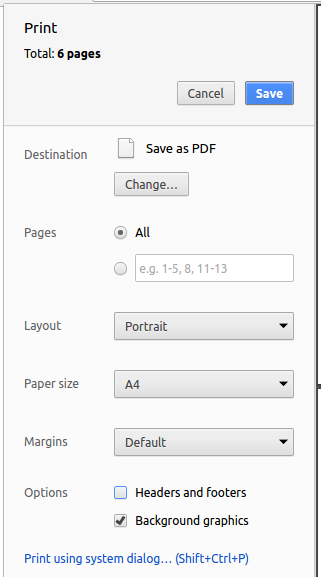
Save as PDF, then clickSaveto save a copy of the file in PDF format. For best results, use the settings indicated in the screenshot below.
Printing
The icon indicates printer-friendly versions of each chapter. A printer-friendly version of the entire book can be found here